Key Takeaways
- A virtual data room is a permissioned online workspace for sharing confidential documents with outside parties
- The comparison that matters is against email and shared drives, not the physical data rooms nobody uses now
- Security is the usual reason cited. Access control and audit records are the reasons that hold up
- Faster diligence comes from reviewers finding documents without asking you, not from faster uploads
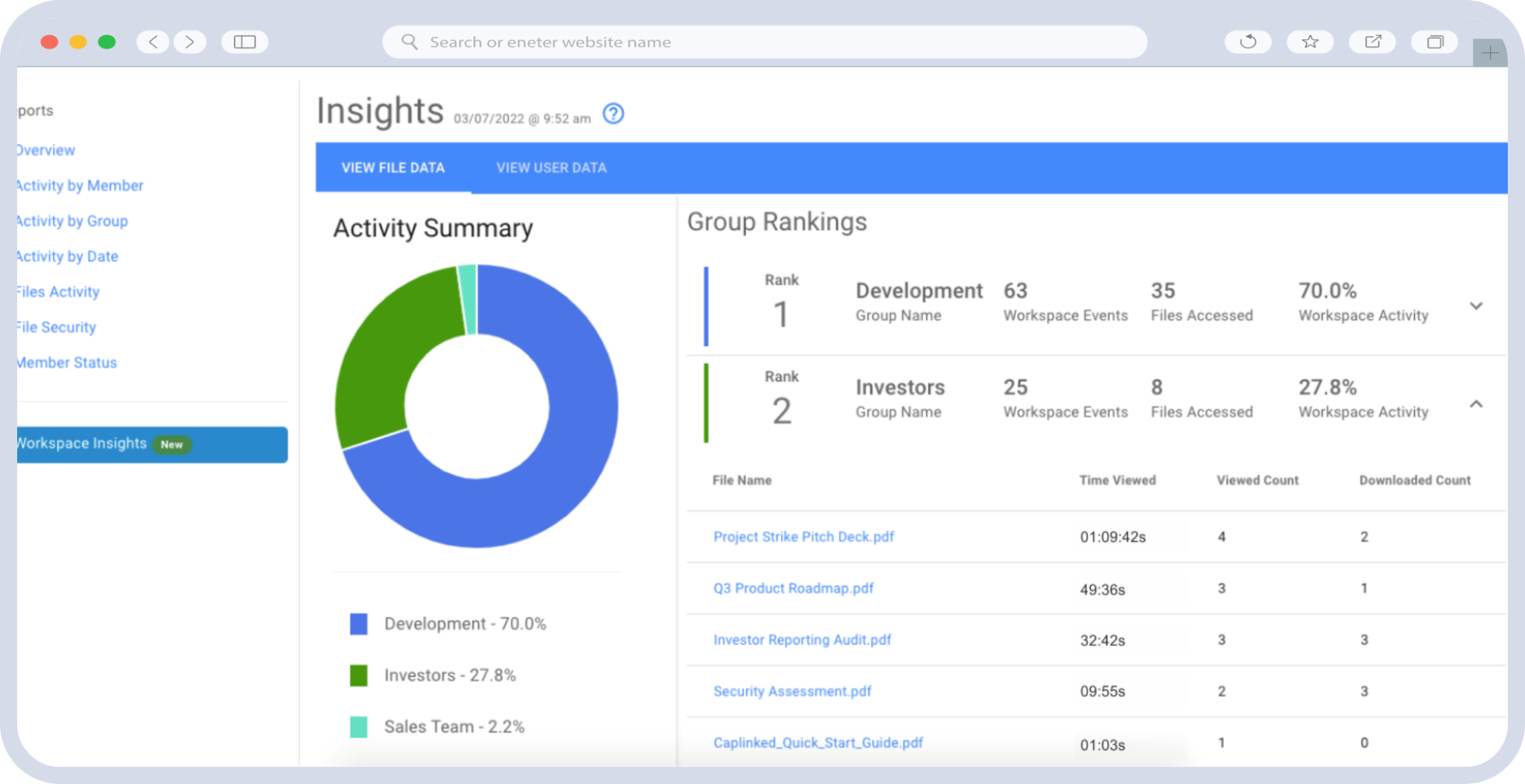
- Activity logs show what was opened and when. They cannot show intent
- Certifications describe the platform. They do not make your own process compliant
- Not every benefit applies. On a small raise, two or three of them carry the whole case
Table of Contents
ToggleA virtual data room is a permissioned online workspace where a company shares confidential documents with outside parties during a transaction. It differs from cloud storage in three ways: access is set per user and per folder, control can persist after a file is downloaded, and every view is recorded.
Most benefits lists for this category are written by people who sell the category, which is worth remembering while reading one. The lists tend to be long, and length is the problem. Several of the benefits are real and decisive, several are marginal, and at least one has been quietly obsolete for years.
The version below separates them. Where a benefit only applies at certain deal sizes, that is stated. Where a capability is routinely oversold, including one CapLinked sells, that is stated too.
Benefits Of a Virtual Data Room
-
Security and Control
Security is the reason most often given for choosing a data room and the reason most vaguely described. Four distinct capabilities sit underneath the word, and they protect against different things.
-
Encryption
Encryption protects the file itself. CapLinked applies 256-bit AES to data at rest and TLS to data in transit, which is the accepted commercial baseline rather than anything exotic. Encryption stops interception. It stops nothing once an authorized user has opened the document.
-
Access control and authentication
Permissions decide who reaches a document and what they may do with it: view, download, edit, upload. Set per folder and per user group, with files private by default. Multi-factor authentication verifies the person is who the account says. These are separate mechanisms from encryption and get conflated constantly.
-
Digital rights management and watermarking
Both extend control past the download. Dynamic watermarks stamp the viewer’s identity across a document as it displays, which makes a photographed screen traceable. Rights management restricts printing, copying and forwarding, and allows access to a downloaded file to be revoked. Neither prevents someone photographing a screen, and any vendor claiming otherwise is overselling.
The record of what happened: who opened which document, when, and what they did. Distinct from activity notifications, which tell you something happened in real time. The audit trail is what you produce months later when someone asks what a party was shown.
| Did You Know
Breaches involving a third party reached 48% in Verizon’s 2026 Data Breach Investigations Report, up 60% year over year across more than 22,000 confirmed breaches. Every document shared outside your organization is a third-party exposure, which is the specific risk permissioned sharing addresses. |
-
Faster Due Diligence
Diligence timelines compress for an unglamorous reason: reviewers stop waiting on you. When a buyer’s accountant can find the revenue build without emailing anyone, an entire class of delay disappears.
The mechanics that produce this are bulk upload with automatic indexing, search that reads inside documents rather than only filenames, and structured Q&A that keeps questions attached to the documents they concern. Bulk upload matters least of the three, though it is the one most often advertised.
Q&A structure is where the real time goes. On a process with several bidders, the same question about a customer contract arrives from four directions. Threaded Q&A routing sends each to the right person to answer and records the response once, rather than producing four slightly different answers across four inboxes.
Speed compounds into leverage. A seller who can move quickly keeps competitive tension alive, and a buyer who can complete review before a rival does gets to negotiate rather than react.
-
Centralized Access and Collaboration
One version of every document, reachable by everyone entitled to it, is a lower bar than it sounds. Deals run on email attachments produce version drift within days, and version drift produces arguments about which model the offer was based on.
A data room removes the ambiguity by making the room the source rather than a distribution point. Advisers, counsel, accountants and the counterparty all read the same file, and when it changes, it changes for everyone at once.
Version history matters more than most buyers check for. Secure document sharing that retains prior versions lets you answer what a document said in March, which comes up more often than anyone expects during a long process.
-
Cost and Time Savings
This benefit is real and routinely argued badly. The standard version compares a data room against the travel, printing and courier costs of a physical room, which was compelling in 2008 and means nothing now. Almost nobody choosing a platform in 2026 is weighing a room full of filing cabinets.
The honest cost case is against the alternative people actually use, which is a shared drive plus email plus a spreadsheet tracking who received what. That combination is free in licence terms and expensive in administration: someone maintains the tracker, chases versions, and manually removes access when a party drops out.
The second cost is the one nobody budgets. An over-disclosure or a leak during a live process has no invoice attached, and no way to unwind it.
Controlled access and a documented handling record help satisfy several regulatory regimes, which matters most in financial services, healthcare, life sciences and legal work. Certifications and assessments are the evidence a vendor offers that its own controls have been examined by someone independent.
One distinction is worth holding onto, because vendors blur it and buyers pay for the blur. A platform holding a certification is not the same as your organization being compliant. SOC 2 assessment covers the provider’s controls. It says nothing about whether your team configured permissions correctly or whether your process meets your own regulator’s expectations.
Frameworks also change, and stale compliance claims are common across this category. The EU-US Privacy Shield was invalidated by the Court of Justice of the European Union in July 2020 and replaced in July 2023 by the EU-US Data Privacy Framework. Any vendor still listing Privacy Shield is quoting a framework that has not existed for six years, which is a reasonable thing to ask about during a security review.
| Common Mistake
Shadow AI is now the third most common non-malicious insider data-loss event, up fourfold year over year, with source code the leading data type submitted to unauthorized platforms, per Verizon’s 2026 breach report. A document that cannot be copied out of its viewer cannot be pasted into a chatbot, which is a use for copy restrictions that barely existed when most data rooms were built. |
Virtual Data Room vs Physical Data Room
Included because people still search for the comparison, though the answer has not been in doubt for over a decade.
| Physical data room | Virtual data room | |
|---|---|---|
| Access | On site, by appointment, often supervised | Any location, any device, subject to permissions |
| Reviewers at once | Limited by the size of the room | Unlimited, each with a different view |
| Setup time | Weeks, including shipping and indexing | Same day for a basic structure |
| Record of activity | A sign-in sheet | Document-level log of every view and download |
| Control after review | None once a document is copied | Rights management can revoke a downloaded file |
| Cost drivers | Premises, printing, courier, travel for every party | Subscription, plus administration time |
The row that still surprises people is reviewers at once. A physical room forces sequential review, which sets the pace of the entire process. Parallel review is the structural change, and the travel saving is a side effect of it.
Common Use Cases
The benefits weigh differently depending on what the room is for.
| Use case | Which benefit carries it |
|---|---|
| Mergers and acquisitions | Parallel review by multiple bidders, each scoped to different folders |
| Fundraising | Staged disclosure, so early conversations see less than committed investors |
| Due diligence on a purchase | Structured Q&A and search across a large document set |
| Audits and regulatory review | The audit trail, and scoped access for external auditors |
| Licensing and IP negotiation | Rights management, because the asset is the document itself |
| Board and investor reporting | Version control and a permanent record of what was circulated |
The differences are practical rather than cosmetic. A startup fundraising room is built for staged disclosure across many light-touch conversations, while an acquisition diligence room is built for depth and volume with fewer parties.
Where Does CapLinked Fit For Your M&A Operations?
Setting up a room involves more than uploading files, and the work happens before anyone outside sees anything: folder structure, permission groups, and deciding what each party gets.
CapLinked’s Concierge service takes that on. Rather than building the folder and file structure yourself, an assigned project manager sets it up, handles ongoing uploads through the process, and stays available as your first line of support. For a lean team running a live raise or sale, that is the difference between a room that is ready and one that is nearly ready.
On the capabilities above: FileProtect digital rights management restricts printing, copying and forwarding, and revokes access to documents already downloaded. Permissions are set per folder with files private by default. Activity Tracker records document-level views and downloads, with the caveats set out earlier about what that data supports.
Security holds current independent assessment against SOC 2, alongside ISO 27001, PCI SAQ-D and FISMA, with HIPAA and HITECH requirements met including support for signing business associate agreements. The full list sits on the security page, and it is worth reading rather than taking on trust from any vendor, including this one.
An open API extends document protection to files held in other systems, and pricing is published rather than quote-gated, which is not universal in this category.
| Comparing data rooms for a live transaction? |
Virtual Data Room Benefits FAQs
What are the main benefits of a virtual data room?
Granular control over who sees which documents, control that persists after a file is downloaded, and a document-level record of every view. Faster diligence and reduced version confusion follow from those three.
Why use a virtual data room instead of Google Drive or email?
Consumer tools treat every viewer alike, cannot revoke a file once downloaded, and give no document-level access record. Those gaps matter as soon as several outside parties need different levels of access.
Do small businesses benefit from a virtual data room?
Yes, though fewer of the benefits apply. On a small raise, staged disclosure and the access record carry most of the value. Parallel multi-bidder review and enterprise administration features generally do not.
What is the difference between a virtual and a physical data room?
A physical room forces sequential, supervised, on-site review. A virtual room allows unlimited parallel reviewers with different permissions, logs every document view, and can be set up the same day.
Does a data room make my company compliant?
No. A vendor certification covers the platform provider’s controls. Your own compliance depends on how you configure permissions, what you disclose, and what your regulator expects of your process.
What can data room activity tracking tell me?
Which documents were opened, by whom, and when. It cannot show why someone opened a file or what they concluded. Treat heavy activity as a prompt for follow-up rather than a forecast.
What are the most common virtual data room use cases?
Mergers and acquisitions, fundraising, due diligence, audits, licensing negotiations, and board reporting. The benefit that matters most differs by use case, which is worth settling before comparing platforms.