Key Takeaways
- The virtual data room features that matter most control what happens to a document after you share it, rather than only where it sits.
- Several controls that vendors treat as premium upgrades, including digital rights management, dynamic watermarking, and structured Q&A, are close to table stakes, so ask what is included before you pay extra for them.
- The pricing model behind a data room decides whether your cost is known when you sign or discovered when the invoice lands, and on a document-heavy deal that gap can run into five figures.
- A complete audit trail is the feature you never think about until a deal is disputed or an auditor asks who accessed what and when.
- The right virtual data room gets a room ready in a single session, keeps diligence organized, and lets you revoke access the moment a bidder walks away.
Table of Contents
ToggleThe virtual data room (VDR) features that matter most to a deal team are granular permissions, digital rights management, dynamic watermarking, verified security certifications, automatic indexing, OCR search, structured Q&A, bulk invitations, a full audit trail, permission-aware AI, and transparent pricing. Together, they control access, speed up the due diligence process, and keep confidential documents secure after they are shared.
A virtual data room, also called a deal room or online data room, is the secure online space where a deal’s confidential documents live during mergers and acquisitions, fundraising, an IPO, or an audit. It replaces the ad hoc mix of email, shared drives, and the old physical data room.
Choosing VDR software is still easy to get wrong, because most vendor checklists read the same and most demos highlight the same handful of controls. A data room can be technically secure and still expose too much, cost far more than the quote, or arrive too late for a deal that needed it live on Monday.
For the investment bankers, private equity teams, and corporate development leaders under a real close date, the useful question is which capabilities change the outcome, and which a vendor includes rather than gates behind the top tier.
As deal values concentrate in larger transactions and due diligence gets deeper and more data-driven (PwC, 2026), the 12 virtual data room features below are grouped by the job each one does: holding control after you share, getting the room ready on time, keeping diligence organized, showing you who is engaged, and keeping cost predictable.
The 12 Virtual Data Room Features at a Glance
Use this as the skim version. Each feature is explained in full below, grouped by the problem it solves rather than listed in order of importance.
| # | Feature | What it protects |
|---|---|---|
| 1 | Granular, group-based permissions | Who can see each file |
| 2 | Digital rights management | Control after download |
| 3 | Dynamic watermarking | Traceability of a leak |
| 4 | Verified certifications and encryption | Compliance and trust |
| 5 | Bulk upload with automatic indexing | Setup speed |
| 6 | OCR full-text search | Findability |
| 7 | Plugin-free guest access | Reviewer adoption |
| 8 | Structured Q&A | Diligence coordination |
| 9 | Bulk invitations | Onboarding at scale |
| 10 | Full audit trail and activity tracking | Accountability and evidence |
| 11 | Permission-aware AI | Reading load under deadline |
| 12 | Predictable pricing and lifecycle control | Cost and post-close cleanup |
Table: The 12 features grouped by the job each one does.
Control That Survives the Download
The features in this group decide who can reach a document and what they can do with it once they have it. This is the line that separates a real VDR from a shared drive, so start here.
-
Granular, group-based permissions
Start with the control that decides everything downstream: who can do what, with which file. A strong data room lets you set view-only, download, upload, and print rights at the folder and file level, and it applies those role-based rights to permission groups rather than to people one at a time.
That distinction matters more than it looks. When you grant access to a group per counterparty, you can later compare how each group engaged, which individual permissioning cannot show you. Rights should cascade to subfolders so you are not resetting them file by file, and they should be revocable at any moment.
CapLinked structures access this way by design, with a group per bidder and rights that flow down the folder tree, which is what makes the per-bidder reporting later in this list possible. Ask any vendor to wall off one bidder from the rest, live, during the demo, and use secure document sharing as your reference for how scoped access should behave.
-
Digital rights management that survives the download
Permissions decide who opens a file inside the room. They do nothing once the file is downloaded, which is the moment most tools lose control. Digital rights management closes that gap.
It should let you revoke a downloaded file so the copy on someone’s laptop stops opening, block printing and re-sharing, and keep reporting activity after the document leaves the platform. This is the sharpest line between a data room and ordinary file storage. CapLinked’s digital rights management layer, FileProtect, converts protected files to PDF on download and lets you pull access at any point, so a bidder who withdraws does not keep a working copy.
| Did You Know
Malicious insider incidents are the most expensive category of data breach, averaging $4.92 million each, according to IBM’s 2025 Cost of a Data Breach Report. Revocable access is a direct control against a departed insider or ex-bidder keeping a usable copy. Source: IBM Cost of a Data Breach 2025 |
-
Dynamic watermarking that carries viewer identity
A watermark that reads Confidential deters no one. A watermark that carries the viewer’s name, email, and IP address changes how carefully a person treats a document, and it traces any leaked page back to the individual who held it.
Look for watermarks that are dynamic and tied to the logged-in viewer, not a single static stamp, and check that you can tune placement and opacity so the page stays readable. CapLinked supports up to seven independently configurable watermarks per page, which is unusually granular for the category. For teams protecting intellectual property during life sciences licensing or technology diligence, that traceability is often the whole point.
-
Verified certifications and strong encryption
Security certifications are where the regulated buyer starts and stops. If a required standard is missing, nothing else about the platform matters to them. Treat ISO 27001 and SOC 2 Type II as a baseline every serious vendor should hold, then match the rest to your industry and ask for current certificates rather than claims on a webpage.
CapLinked’s platform security covers SOC 2 Type II, ISO 27001, HIPAA and HITECH with signed business associate agreements, PCI SAQ-D, and FISMA, with 256-bit AES encryption at rest and TLS in transit on AWS infrastructure. Defense and aerospace teams can look at its CMMC-compliant data room options, and healthcare teams at its healthcare and pharma coverage.
Alongside the certificates, confirm the everyday controls a reviewer relies on:
- Two-factor authentication, also called multi-factor authentication (MFA)
- IP restrictions that limit access to approved networks
- Clear answers on data residency and GDPR obligations for cross-border deals
| Certification | What it covers | Who needs it most |
|---|---|---|
| SOC 2 Type II | Audited controls for security and data handling | Every serious buyer, treat as baseline |
| ISO 27001 | International information security management | Global and enterprise deals, baseline |
| HIPAA and HITECH | Protected health information, with BAA support | Healthcare, pharma, life sciences |
| PCI SAQ-D | Payment and cardholder data protection | Financial services and payments |
| CMMC and FedRAMP | Federal and defense information security | Defense, aerospace, government work |
Table: Match the certification to your industry before you shortlist a vendor.
A Room That Is Ready When the Deal Opens
Setup is where the person who was handed the room either wins or loses the first week. These three features decide how fast a room goes from empty to diligence-ready, and whether reviewers can actually work in it.
-
Bulk upload with automatic indexing
Setup speed is a deal risk, not a convenience. A room that is not ready when the process opens delays the process, and the person building it is usually an analyst or ops lead who was handed the job on top of everything else. Demand drag-and-drop upload of full folder structures and automatic indexing, so numbering applies itself and re-applies when you move things around.
That is the difference between a due diligence data room that is ready in a single session and one that eats a week. CapLinked indexes files automatically as they upload and re-indexes when folders move, and version history keeps a trail on every re-saved file instead of quietly overwriting the last one. Pair it with document management and due diligence workflows so the structure holds up once reviewers arrive.
| Common Mistake
Teams test a data room with a tidy sample folder, then find that the real upload of a few thousand mixed files behaves differently. Load your actual, messy folder structure during the free trial so indexing, search, and permissions are all tested under real deal conditions before you commit. Source: PwC Global M&A Outlook 2026 |
-
OCR full-text search
A stalled diligence process is often a findability problem rather than a document problem. A buyer asks for a schedule that already sits in the room, nobody can locate it fast enough, and the request gets answered twice while the Q&A log gets messier.
Full-text search with optical character recognition solves this by making scanned and image-based documents searchable by their content, not only by their file names. CapLinked runs OCR on search so a scanned contract from years ago turns up on a keyword instead of staying invisible in a folder, as shown in its features overview. Look for in-platform redaction alongside search, so a confidential figure or a name can be removed before a reviewer ever sees the sensitive information behind it.
-
Plugin-free access for every guest
The people you least control are the ones you most need to keep moving: the buyer’s counsel, their accountants, and their advisors. If your platform asks them to install a plugin or download software, some will push back, and the process slows at exactly the wrong moment.
Insist on browser-based access with nothing to install on the guest side, which also shortens training when a new reviewer joins mid-diligence. CapLinked runs in the browser with no plugins on either side, works from any device, desktop or mobile, and a team is usually trained in 45 minutes or less. If you are replacing an old file-transfer setup or basic secure file sharing, a browser-based FTP alternative removes the software friction entirely.
Diligence That Stays Organized
Once the room is live and populated, the work shifts to coordination. The next two features keep questions and access under control when several parties are moving at once.
-
Structured Q&A
Diligence questions do not belong in email, where the same question gets answered four different ways in four threads and attribution disappears. A structured Q&A module, the main collaboration tool inside a deal room, keeps questions in one place, routes them to the right person, tracks status, and lets you promote a strong answer to a shared FAQ so you answer once for everyone.
Ask whether it is included or sold as an upgrade. CapLinked’s EZ Q&A does this at the entry tier and lets you control whether members of the same group see each other’s questions, which matters in a competitive process. In fairness, some platforms built for large multi-bidder auctions offer deeper Q&A workflows, so if you run those regularly, press on that point specifically.
-
Bulk invitations
Onboarding a long bidder list one email at a time is a hidden tax on competitive processes. Look for bulk invitations by CSV or address-book import, reusable invitation messages, and clear status tracking so you can see who has accepted and who is still pending. It sounds minor until you are inviting 40 external reviewers under a deadline.
CapLinked supports individual, CSV, and Salesforce address-book invitations with saved messages, which is the kind of thing an enterprise team running several deals a year feels immediately. For larger deployments, confirm single sign-on (SSO) and IP whitelisting are available, since they decide how cleanly a big internal team gets access without weakening data security.
Visibility Into Who Is Actually Engaged
A deal lead spends half the process guessing at intent. The next two features replace that guesswork with a record, and give the general counsel the evidence they will need if the deal is ever questioned.
-
Full audit trail and activity tracking
Two different people need this feature for two different reasons. The deal lead wants to know who read the financials and for how long, because that changes who they follow up with that afternoon. The general counsel wants a complete, exportable access record, because if the deal is ever disputed, the audit trail is the evidence.
Demand activity data at the group, document, and individual level, with view duration and export at every level. Read it carefully, though, since a high view count shows activity, not intent, and it cannot tell you why a document was opened.
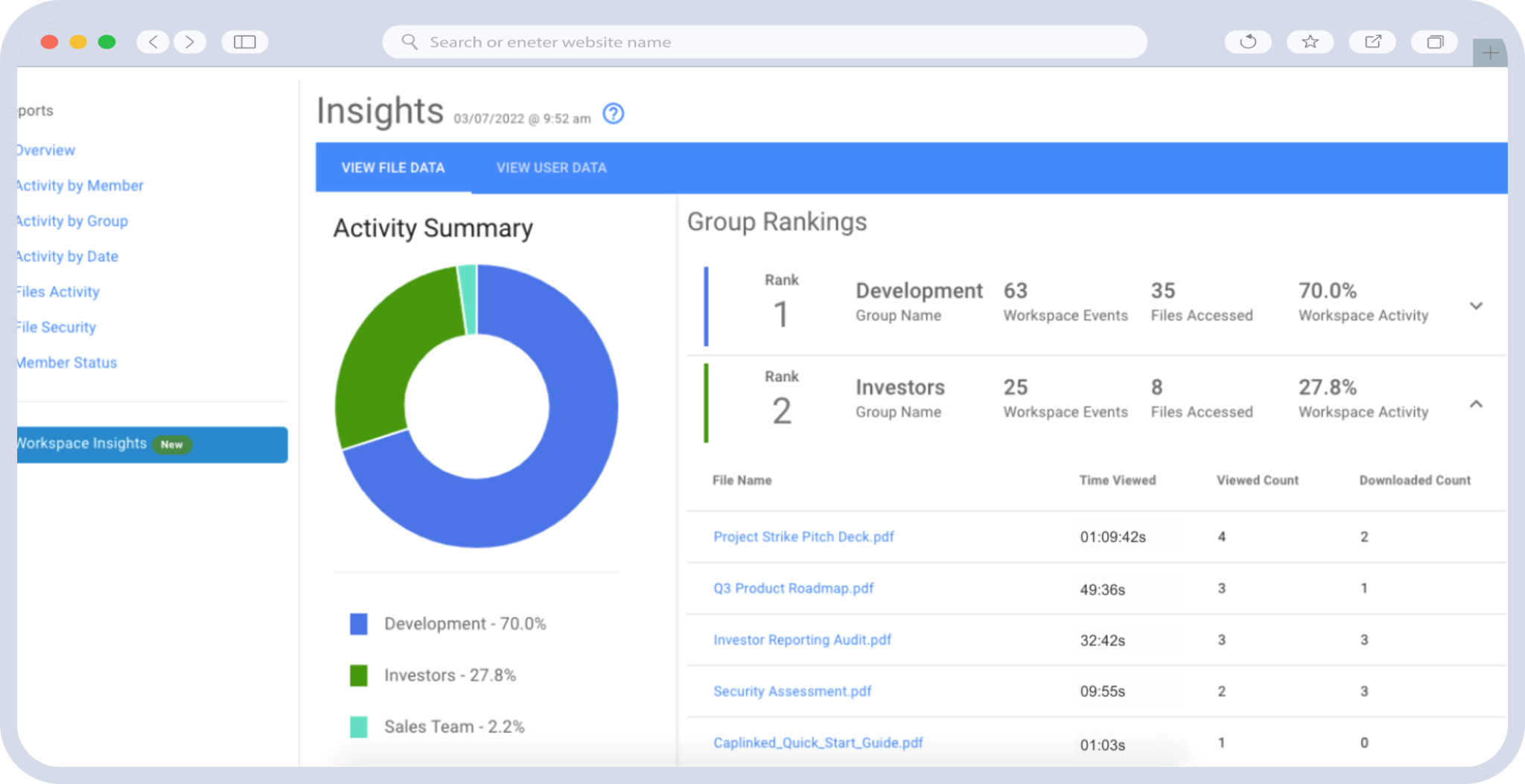
CapLinked charts engagement by group, document, and person, with CSV export, and its legal compliance records are built to hold up after close. Set notifications on the most sensitive files so you know the moment one is opened, and treat the reporting as deal analytics that shapes your next move rather than a static log.
| Worth Knowing
Roughly 20% of data breaches involve a former employee, and lingering access after someone leaves is a recognized compliance failure under regimes like HIPAA and GDPR. In a deal, the equivalent risk is the bidder who dropped out but still holds documents, which is why a durable audit trail and revocable access work together. Source: ISACA, 2025 |
-
Permission-aware AI
AI in data rooms ranges from genuinely useful to marketing noise, so make the vendor name the function rather than say the platform is intelligent. The two tasks worth automating are the ones that consume the most time: reading long documents and summarizing room activity. The controls matter as much as the capability, because an AI summary that ignores your permission model is a leak waiting to happen.
CapLinked’s AI Document Summary condenses a document in roughly 30 to 60 seconds, respects the same permission groups as the rest of the room, and can flag internal contradictions such as figures that do not match across sections. Its AI Executive Report packages room activity for administrators. Some competitors ship broader AI suites, so if you need bulk translation or automated redaction at scale, weigh that separately.
| Practical Tip
21% of M&A professionals already report using generative AI, and more than half expect to by 2027 (Bain & Company, 2025). Before you switch on any AI feature in a data room, confirm it inherits your existing permission groups so a summary cannot surface what the underlying document hides. Source: Bain & Company M&A Report 2025 |
Terms You Can Live With
The last feature is commercial, and it is the one that surprises people at the invoice. How a room is priced and how it closes down belong on the checklist alongside every security control above.
-
Predictable pricing and lifecycle control
The pricing model decides whether your cost is known when you sign or discovered when the bill arrives. Per-page and per-user models tie your cost to how the deal goes rather than what you agreed to, and on a document-heavy process the gap between models can reach five figures.
Before you sign, get four things in writing:
- The pricing model and exactly what counts toward it
- The overage rate, not just the headline price
- Year-two pricing, since introductory rates reset
- How the room closes, ideally an expiry date that revokes all access
CapLinked publishes a flat $399 per month Team rate, as of August 2026, with 5GB, no long-term contract, and DRM, watermarking, Q&A, OCR, activity tracking, and SOC 2 included at that tier. It also supports workspace expiry that revokes access and protected downloads automatically.
Lower-priced flat-rate options exist with narrower capability, so the honest comparison turns on whether you need the deeper controls above. Check the pricing page for the current figure before you compare.
| What you are billed for | Flat-rate example (CapLinked Team) | Per-page model (illustrative) |
|---|---|---|
| Monthly basis | $399 flat, 5GB, no contract | A fee charged per page uploaded |
| A 10,000-page upload | Included | About $4,000 to $8,500 in upload fees |
| Adding external reviewers | Unlimited guest users | Often billed per user |
| Deal runs two weeks long | No change | May trigger an extension or new cycle |
| Cost known upfront? | Yes, at signing | Often not until the invoice |
Table: Illustrative comparison of pricing models. Per-page figures are industry estimates, not a specific vendor’s published price, as of August 2026.
| Running the numbers for a real deal and want a figure you can take to finance? CapLinked publishes its rates and will match any comparable written quote. |
Why Choose Caplinked As Your Go-to Virtual Data Room?
These are the virtual data room features worth demanding in any secure data room: the ones that hold control after you share, get the room ready before the process opens, keep diligence organized, show you who is engaged, and keep your cost predictable. Everything else is a nice-to-have. Build the checklist first, take the demo second, and make the vendor prove each control live rather than describe it.
Watch one signal above the rest: which capabilities a vendor includes at the entry tier versus gates behind the top one. A platform that puts digital rights management, structured Q&A, and a full audit trail in front of every customer is telling you something about how it treats the work. Load a real folder, invite a test guest, and see how the room behaves under deal conditions before you sign anything.
| Want to test a room against this checklist yourself? Spin one up with your own documents and see how it holds up under real deal conditions. |
Frequently Asked Questions
What features should a virtual data room have?
The core virtual data room features are granular permissions, digital rights management, dynamic watermarking, current certifications, automatic indexing, OCR search, structured Q&A, a full audit trail, and transparent pricing. The controls that manage a document after download are what separate a data room from ordinary storage.
How is a virtual data room different from Dropbox or Google Drive?
Consumer storage is built to share files. A virtual data room, or VDR, is built to control what happens after you share them, with per-bidder permissions, revocable downloads, identity-carrying watermarks, and a complete audit trail. Those controls do not exist in general file-sharing tools.
What does digital rights management do after a file is downloaded?
It keeps control of a document once it leaves the platform. DRM can block printing and re-sharing, carry a viewer-identifying watermark, and revoke access so a downloaded copy stops opening, even after it is saved to someone’s device.
Are watermarking and audit trails standard or paid add-ons?
It depends on the vendor. Many reserve digital rights management, watermarking, and detailed reporting for higher tiers. Ask what is included before you compare prices, since gated security features can make a low headline rate misleading.
Why does a data room invoice often exceed the quote?
Per-page and per-user pricing ties cost to how the deal unfolds. Extra pages, re-uploads, added reviewers, and timeline extensions all raise the bill. Flat-rate pricing with the overage terms in writing keeps the number predictable.
What is the most important feature for M&A due diligence?
There is no single one, but permission control and the audit trail carry the most weight. Permissions prevent exposure during the process, and the audit trail proves who accessed what afterward, which matters if the deal is ever contested.
Does a small or first-time deal need a full-featured data room?
Often yes. Even a two-person team running a first sell-side process benefits from controlled access, a clean index, and a record of who viewed what. The cost of a leak or stalled diligence far outweighs the platform.