Key Takeaways
- A due diligence virtual data room is a permissioned workspace where a seller publishes deal documents and controls what each outside party can open, download, and keep.
- Setup starts with the request list, not the platform. The list becomes your folder tree, your permission groups, and your Q&A index.
- Numbered folders that match the request list let counsel reference an item by number instead of describing a file path.
- Permission groups with staged disclosure replace separate bidder rooms, which halves the maintenance and removes version drift.
- Run a pre-launch audit before the first external invite. Test the room from a non-administrator account.
- Post-download control matters more than the room itself, because bidders who withdraw keep whatever they saved.
- Setup speed is a deal risk. A room that is not ready delays the process at the point where speed affects outcome.
Due diligence rarely stalls because the documents do not exist. It stalls because nobody can find them, the wrong bidder can see them, or the room opens before it is ready.
A due diligence virtual data room fixes that, provided it is configured before the first external reviewer logs in. The folder index, permission groups, security controls, Q&A ownership, and disclosure stages all need to be in place in advance.
This guide covers the seven steps to setup due diligence virtual room in order, with a folder structure you can copy, a permission model that scales across bidder rounds, and a pre-launch checklist. According to a KPMG study, 52% of corporate deal makers consider due diligence a significant challenge, and most of that friction is structural rather than legal.
What a Due Diligence Virtual Data Room Actually Does
A due diligence virtual data room is a permissioned, auditable workspace where a seller publishes confidential documents and controls exactly which buyers, lawyers, bankers, and auditors can open each file. Consumer file-sharing tools handle the sharing but not the control, and the gap shows up in five specific places.
| Deal pressure | What goes wrong without a VDR | Effect on the deal |
|---|---|---|
| Time | Buyers wait on documents that were never indexed | Momentum drops and exclusivity windows expire |
| Confidentiality | Files leave your control at the download button | Competitive information reaches parties who exited |
| Volume | Hundreds of files across categories with weak search | Reviewers miss material items and issues surface late |
| Multiple parties | Bidders and advisors work from shared folders | The wrong party opens the wrong document |
| Compliance | No reliable record of who accessed what | Post-close disputes become harder to resolve |
Table 1: Where general file-sharing tools fall short in a diligence process.
The last row carries the longest tail. A bidder who reviews your financials and later withdraws may still hold competitive information, and without an audit trail you cannot establish what they saw or when their access ended.
The Seven-Step Due Diligence Virtual Room Setup Process
Most teams assume setup for due diligence begins when they choose a platform. It begins two to four weeks earlier, with the request list. The software is the fastest part of this sequence, and treating it as the starting point is what produces rooms that open half-built.
Step 1: Build the request list
Identify every document the counterparty will ask for and group it by category: corporate, financial, tax, commercial, legal, IP, HR, technology, real property, insurance, and environmental. Assign an internal owner to each item so nothing waits on an unnamed person.
Tailor the list to the deal. An asset sale needs different documentation than a stock sale, and regulated sectors add compliance records. Start from a comprehensive due diligence checklist and cut what does not apply.
Step 2: Choose the platform and set the security baseline
Configure authentication, watermarking, session timeouts, and access restrictions at the workspace level before any file moves. Every document then inherits the same protection on upload, which is far cheaper than auditing permissions file by file later.
One practical filter when comparing platforms: whether guests need a plugin or download. Buyers, counsel, and accountants work across different IT environments, and a plugin requirement turns day one into a support queue. Check the virtual data room feature set for what to switch on before launch.
| Worth knowing
AI is now part of the deal process itself, not only the tooling around it. Roughly a quarter of large transactions valued at $5 billion or more carried an AI theme in the most recent quarter reported by the Harvard Law School Forum on Corporate Governance, and AI is increasingly used to automate diligence and disclosure schedules. |
Step 3: Build the folder and index structure
Create the full folder tree before uploading anything, mirroring your request list category for category. Number the top-level folders so ordering stays stable regardless of how the platform sorts.
The numbering earns its keep in Q&A. If the request list calls an item 3.4 Material Customer Agreements, use that exact label in the room. Counsel then references 3.4 in a question rather than describing a file path, and your subject matter expert knows immediately which folder to open.
Keep the hierarchy to about three levels. Deeper nesting means reviewers stop browsing and start asking, which moves work into Q&A that the structure should have absorbed.
Step 4: Prepare and upload documents
Bulk upload the prepared tree rather than building folders in the platform and dragging files in one at a time. Apply a naming convention before upload: category, document type, period, version.
Financial_AuditedStatements_FY2025_v2.pdf
Legal_CustomerMSA_Acme_v1.pdf
Run optical character recognition on scanned documents so their contents are searchable. Without it, a scanned contract is invisible to search and generates avoidable questions. For a category-by-category view of what to upload into your data room, start there and adapt.
Step 5: Create permission groups and disclosure stages
Grant access to groups rather than individuals. Rights cascade to subfolders, so promoting a bidder round is one action instead of a folder-by-folder review. Group-based permissioning is also what makes group-level engagement reporting possible later.
Build the complete room, then release it in stages as bidders advance. The structure never changes; only the permissions do. Staged disclosure is one of the more reliable ways to compress the diligence timeline and reduce deal risk.
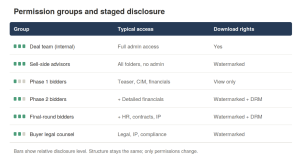
| Group | Typical access | Download rights |
|---|---|---|
| Deal team | Full administrative access | Yes |
| Sell-side advisors | All folders, no admin settings | Yes, watermarked |
| Phase 1 bidders | Teaser, CIM, high-level financials | View only |
| Phase 2 bidders | Adds detailed financials and material contracts | Watermarked, DRM applied |
| Final-round bidders | Adds HR data, customer contracts, IP detail | Watermarked, DRM applied |
| Buyer counsel | Legal, IP, litigation, compliance folders | Watermarked |
Table 2: A permission model that scales from first round to exclusivity.
| Common mistake
Building a separate room for each bidder group. It doubles maintenance, guarantees version drift between rooms, and removes any single view of engagement. One room with staged permissions does the same job with none of the overhead. |
Step 6: Invite parties and run structured Q&A
Invite by permission group so each participant receives the right access for their stage, and invite in waves as the process advances. Move questions into the platform on day one.
Set expectations before the first question arrives: questions go through the platform, the response target is 48 hours, and answers may be published to all relevant bidders. Structured Q&A management at scale keeps a single answer of record, which is what stops two bidders receiving different versions of the same answer.
Step 7: Audit the room, then monitor and archive
Run a pre-launch pass before the first external invite. The most useful test is opening the room from a non-administrator account, because administrator view hides exactly the permission errors you are looking for.
| Check | What to confirm |
|---|---|
| Documents | No drafts uploaded, versioning consistent, OCR complete |
| Redaction | Metadata stripped and redactions verified in preview |
| Permissions | Groups staged correctly, sensitive folders locked to final round |
| Protection | Downloads restricted where required, watermarking and DRM active |
| Q&A | Owner assigned and response target agreed |
| Access | Room tested from a non-administrator account, audit logging on |
Table 3: Pre-launch audit checklist, to be completed before any external invite.
Once live, the activity log answers the question every deal lead is asking, which is who is actually reading this. Review engagement weekly. After close, revoke external access, export the complete audit trail, and archive the workspace so the next mandate starts from a proven structure.
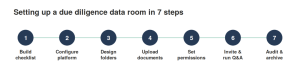
Caption: The seven-step setup sequence, from request list to post-close archive.
Alt text: The seven steps to set up a due diligence data room: build checklist, configure platform, design folders, upload documents, set permissions, invite and run Q&A, audit and archive.
| Your room should be ready before the first buyer logs in.
Configure folders, permission groups, watermarking, DRM, and Q&A in a live workspace during a 14-day trial. |
A Folder Structure You Can Copy
The structure below works across most transaction types. It becomes a working disclosure plan once each category carries a named owner and a release stage, which turns a static tree into a schedule your deal team can execute against.
| Folder | Typical owner | Release stage |
|---|---|---|
| 01 Corporate | Legal or corporate secretary | Phase 1 |
| 02 Financial | CFO or finance | Phase 1 |
| 03 Tax | Finance or tax advisor | Phase 1 |
| 04 Commercial | Commercial or legal | Phase 2 |
| 05 Legal | General counsel | Phase 2 |
| 06 Intellectual property | Legal or product | Phase 2 |
| 07 Human resources | HR or legal | Final stage |
| 08 Technology | Engineering or security | Phase 2 |
| 09 Real property | Finance or facilities | Phase 2 |
| 10 Insurance and environmental | Risk or legal | Phase 2 |
Table 4: Top-level folders with owner and disclosure stage.
Three habits keep the structure intact once the room is busy. Place a one-page folder index in the root so new reviewers understand the layout without asking. Keep version numbers in file names rather than creating a folder per revision, and move superseded files to an archive subfolder in the same category. Archive one master copy after close so the next deal starts from a populated framework.
Industry and transaction type decide what to add. A healthcare deal needs clinical and regulatory categories a manufacturing deal does not, so check industry-specific diligence checklists before finalizing.
What to Look for When Comparing Platforms
If you have not selected a platform, evaluate on the criteria that decide whether diligence runs cleanly, rather than on feature counts. Score every vendor against the same list before you sit through a demo.
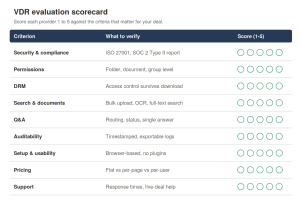
| Criterion | What to verify | Why it decides the outcome |
|---|---|---|
| Security | Independent assessment against ISO 27001 and SOC 2 | The buyer’s security team must clear it |
| Permissions | Group-level rights that cascade to subfolders | Staged disclosure without manual review |
| Post-download control | Revocation and expiry after download | Bidders who withdraw keep what they saved |
| Search | Bulk upload, automatic indexing, OCR, full text | Fewer questions that structure should absorb |
| Q&A | Routing, assignment, single answer of record | Stops conflicting answers reaching bidders |
| Audit trail | Timestamped, exportable at every level | Defensible record after close |
| Onboarding | Browser access with no guest-side software | External users start the same day |
| Pricing | Flat rate against per-page or per-user billing | Cost stays proportional to deal, not volume |
Table 5: Evaluation criteria for a due diligence platform.
| Note
These standards are not interchangeable, and the distinction matters when a buyer’s security team reviews your room. ISO 27001 is a certification, SOC 2 is an audit report, and HIPAA is a compliance framework rather than a certification. Ask to see the current report. Legal commentary collected by the Harvard Law School Forum on Corporate Governance shows how often diligence records are examined after close. |
Pricing deserves a direct question. Per-page and per-user models make costs unpredictable on document-heavy deals, particularly when timelines extend and documents are re-uploaded. Compare how virtual data room pricing models work and confirm what triggers an overage before signing.
Post-download control is the criterion most often skipped. Digital rights management applied to data room files is what separates a data room from a shared drive, because it governs the file after it leaves the room rather than only inside it.
How CapLinked Handles This Workflow
This process works on any competent platform. CapLinked is built for the specific problem it describes, which is standing up a controlled room quickly and running a multi-party process without losing the thread.
| Setup task | CapLinked capability |
|---|---|
| Stand the room up | Browser-based workspaces with no plugin or download on the guest side |
| Move an existing tree in | Drag-and-drop upload with automatic indexing that re-indexes when numbering changes |
| Make scans searchable | Built-in OCR search |
| Stage bidder access | Permission groups with view, download, and upload rights cascading to subfolders |
| Control files after download | FileProtect converts to PDF, applies watermarks, blocks printing, and revokes access after download |
| Trace a leaked page | Up to seven custom watermarks per page carrying viewer name, email, and IP address |
| Speed up first-pass review | AI Document Summary condenses a document in roughly 30 to 60 seconds, with access controlled per group |
| Centralize questions | EZ Q&A with routing, assignment, and a promotable shared FAQ |
| Read engagement | Activity Tracker with group and individual drill-down, exportable at every level |
| Close the room on schedule | Workspace expiry revokes access and DRM-protected downloads at a set date |
Table 6: Setup tasks mapped to the capability that handles them.
On security, CapLinked is assessed against SOC 2 and ISO 27001, encrypts data at 256-bit at rest and in transit, and runs on AWS infrastructure, with a GovCloud offering for defense and government work. The Team plan is $399 per month with custom watermarking, FileProtect, EZ Q&A, Activity Tracker, and OCR search included at the entry tier rather than reserved for enterprise.
| See the seven steps in a live workspace.
Set up folders, permission groups, watermarking, DRM, and Q&A on a 14-day trial. Published pricing, no long-term contract. |
Frequently Asked Questions
What is a due diligence virtual data room?
A permissioned online workspace where a seller publishes confidential deal documents and controls which buyers, advisors, and counsel can open, download, or keep each file, with watermarking, audit logging, and revocation after download.
How long does it take to set up?
Preparation takes two to four weeks, mostly document collection and building the request list. The technical setup of the room itself is completed in a single session once materials and access groups are ready.
How should the folder structure be organized?
Mirror your request list category for category, number the top-level folders so ordering stays stable, and keep the hierarchy to about three levels. Create the full structure before uploading anything.
Who should see each section?
Use permission groups. Early-round bidders see corporate, financial, and tax material. Commercial contracts, IP, and HR data open up in later rounds. Buyer counsel receives legal, IP, and compliance folders.
What should you check before inviting buyers?
No stray drafts, OCR complete, redactions verified, permission groups staged, downloads and watermarking set, a Q&A owner assigned, audit logging on, and the room tested from a non-administrator account.
Should each bidder get a separate room?
No. Separate rooms double maintenance and cause version drift between them. One room with staged permission groups gives the same segregation and a single view of engagement.
Can a closed data room be reused?
Yes. Archive the completed structure as a template so the next transaction starts from a populated framework rather than an empty room, which removes most of the setup work.