The average M&A transaction takes between six and twelve months to close, and due diligence alone can consume 60% or more of that timeline. For dealmakers under pressure from boards, investors, and competitive bidders, every week of delay erodes value and increases the risk of deal fatigue. The solution isn’t cutting corners — it’s building a smarter workflow. A well-structured virtual data room due diligence process can compress review cycles by 20–30%, giving buyers confidence faster and helping sellers maintain deal momentum. In this guide, we break down the exact frameworks, organizational strategies, and technology-driven workflows that top M&A teams use to accelerate transactions without sacrificing thoroughness.
Table of Contents
ToggleWhy Traditional Due Diligence Slows Down M&A Deals
Before we prescribe solutions, it’s worth diagnosing the problem. The due diligence process in M&A has historically been plagued by inefficiencies that compound over time:
- Fragmented document repositories: Financial statements in one folder, legal contracts in another email thread, and tax records on a shared drive. Buyers waste hours hunting for information instead of analyzing it.
- Manual access management: Controlling who sees what — especially when multiple bidders are involved — becomes an administrative nightmare with traditional file-sharing tools.
- Lack of visibility: Sellers have no insight into which documents buyers have reviewed, where they’re spending time, or what questions are likely coming next.
- Version control chaos: When documents are updated mid-process, outdated versions circulate, creating confusion and potential liability.
According to McKinsey & Company’s M&A research, poor due diligence execution is among the top reasons acquisitions fail to deliver expected value. The stakes are too high to rely on ad hoc processes.
The Role of a Virtual Data Room in Modern Due Diligence
A virtual data room (VDR) is a security-first digital workspace purpose-built for the demands of M&A due diligence. Unlike generic cloud storage platforms, a VDR provides granular permission controls, real-time audit trails, document watermarking, and collaboration tools designed specifically for multi-party deal environments.
The shift from physical data rooms to virtual ones isn’t just about convenience. It fundamentally changes the economics and velocity of deal-making. VDRs provide round-the-clock accessibility via a single secure link, eliminating the geographic and scheduling constraints that once forced buyers to fly teams across the country to review binders in a conference room. The U.S. Securities and Exchange Commission (SEC) has long emphasized the importance of accurate and complete disclosure in M&A transactions — a VDR makes it materially easier to meet those standards while maintaining an auditable record of every interaction.
Core VDR Capabilities That Accelerate Due Diligence
- Granular permissions: Control access at the document andfolder level. Show different information to different bidder groups without duplicating files.
- Dynamic watermarking: Automatically stamp documents with the viewer’s name and timestamp, deterring unauthorized distribution.
- Full-text search: Allow buyers to locate specific clauses, figures, or terms across thousands of documents in seconds.
- Q&A management: Centralize buyer questions and seller responses in a structured, trackable format — no more scattered email chains.
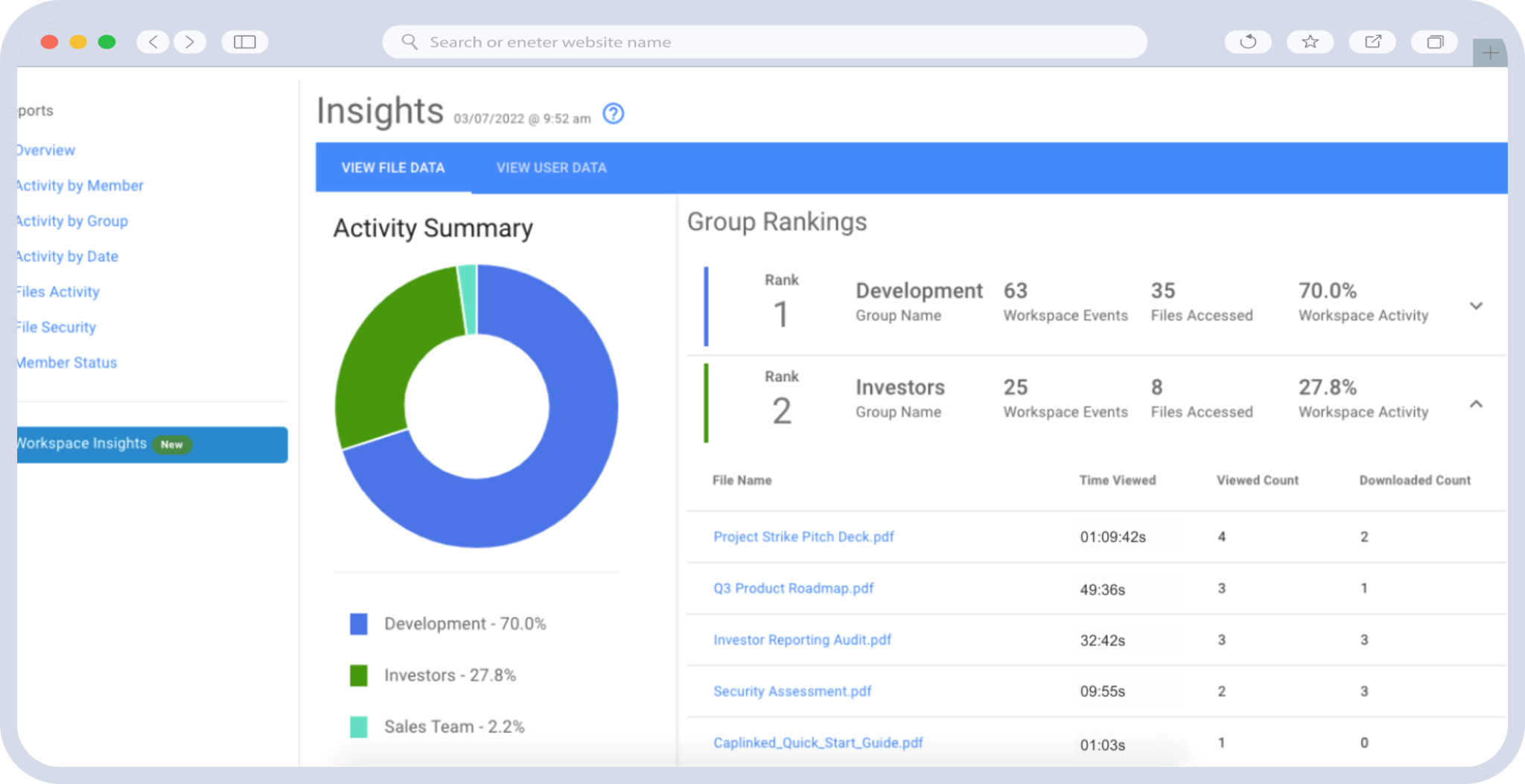
Activity analytics: See exactly which documents each party has viewed, for how long, and how often, giving sellers strategic intelligence about buyer interest levels.
Step-by-Step VDR Workflow for Accelerating M&A Due Diligence
The following framework is designed for immediate implementation. Whether you’re a sell-side advisor preparing a company for market or a buy-side team gearing up for a competitive process, these steps will dramatically improve your deal management efficiency.
Step 1: Define Scope and Objectives Before You Upload Anything
The most common mistake teams make is treating VDR setup as an administrative task rather than a strategic one. Before a single document enters the data room, stakeholders should align on:
- The transaction type (asset sale, stock sale, merger) and its specific disclosure requirements
- The anticipated buyer profile and what information they’ll prioritize
- Regulatory requirements that may dictate specific disclosures (industry-specific compliance, antitrust filings, etc.)
- A realistic timeline with milestones tied to data room phases
The Harvard Law School Forum on Corporate Governance regularly publishes guidance emphasizing that well-scoped due diligence — with clear objectives and predefined risk categories — consistently leads to better deal outcomes and faster closings.
Step 2: Build a Comprehensive Due Diligence Checklist
Your checklist serves as the architectural blueprint for your entire document organization in M&A. A thorough checklist typically spans 15–25 categories, including:
- Corporate governance documents (articles of incorporation, bylaws, board minutes)
- Financial statements and auditor reports (3–5 years of audited financials, interim statements)
- Material contracts (customer agreements, supplier contracts, leases, partnership agreements)
- Intellectual property portfolios (patents, trademarks, trade secrets, licensing agreements)
- Employment and benefits information (key employee contracts, equity plans, organizational charts)
- Litigation and regulatory matters (pending or threatened lawsuits, regulatory correspondence)
- Tax records (federal, state, and local returns; transfer pricing documentation)
- Environmental and real estate matters
- Insurance policies and claims history
- Technology and cybersecurity assessments
Build this checklist collaboratively with legal counsel, financial advisors, and the management team. Missing categories don’t just slow down due diligence — they can create post-closing liabilities that unwind deal value.
Step 3: Organize the Data Room with Buyer Psychology in Mind
This is where VDR workflow optimization separates sophisticated deal teams from the rest. The folder structure should mirror your due diligence checklist, but the hierarchy should reflect how buyers actually consume information — not how your internal filing system works.
Best practices for folder architecture:
- Use a numbered index system (1.0 Corporate, 2.0 Financial, 3.0 Legal, etc.) so buyers can quickly orient themselves.
- Place the most critical and most-requested documents in the top-level folders. Financial statements, material contracts, and the company overview should be immediately accessible.
- Use consistent, descriptive file naming conventions: [Category]_[Document Type]_[Date]_[Version]. Example: “3.2_Customer_Agreement_Acme_Corp_2024-01-15_v2.pdf”
- Create a dedicated “Key Documents” or “Executive Summary” folder with management presentations, the CIM, and a document index — this gives buyers a starting point and reduces early-stage confusion.
Step 4: Configure Security and Access Controls Before Granting Entry
Security isn’t just about protecting data — it’s about building trust with all parties and maintaining legal defensibility. Before inviting any external users into the VDR:
- Set role-based permissions: Differentiate access levels for buyers, their legal counsel, financial advisors, and management team members. Not every party needs to see everything.
- Enable fence-view or redacted access for early-stage bidders, expanding permissions as parties advance through the process.
- Activate two-factor authentication for all users — this is non-negotiable in 2025.
- Configure download and print restrictions on the most sensitive documents, such as customer lists and proprietary technology documentation.
- Set session timeouts and IP restrictions where appropriate, especially for cross-border transactions with data sovereignty considerations.
These controls don’t just protect the seller — they signal to buyers that the process is professionally managed, which itself accelerates trust-building and deal velocity.
Step 5: Activate Q&A Workflows to Eliminate Email Bottlenecks
The Q&A process is often the single biggest bottleneck in due diligence. When buyer questions flow through email, they get lost, duplicated, routed to the wrong people, and answered inconsistently. A VDR’s built-in Q&A module transforms this from a liability into an asset.
Actionable Q&A workflow tips:
- Assign each question category to a specific internal expert (finance questions to the CFO’s team, legal questions to outside counsel, etc.)
- Set response SLAs — 24 to 48 hours is the standard expectation for most deal processes. Track compliance against these targets.
- Use the Q&A log as an intelligence tool: clusters of questions about a specific topic often signal buyer concerns that should be proactively addressed.
- Pre-populate answers to anticipated questions by including FAQ documents or management commentary alongside key exhibits.
Step 6: Monitor Analytics and Adapt in Real Time
One of the most underutilized advantages of a modern VDR is the analytics dashboard. Activity tracking gives sellers and their advisors a real-time window into buyer behavior:
- Gauge buyer seriousness: A bidder who has spent 40 hours in the data room reviewing financial models is more engaged than one who opened the CIM once.
- Anticipate information requests: If multiple buyers are spending significant time on the same section, prepare supplementary materials proactively.
- Identify stragglers: If a key party hasn’t accessed critical documents, a gentle nudge from the deal team can prevent timeline slippage.
Support negotiations: Understanding which areas buyers scrutinized most heavily helps sellers prepare for the issues that will surface in purchase agreement negotiations.
Common Mistakes That Derail Virtual Data Room Due Diligence
Even experienced deal teams fall into predictable traps. Avoid these to keep your process on track:
- Uploading documents without review: Every document should be vetted by counsel before it enters the data room. Privileged communications, draft documents with track changes, and documents containing unrelated sensitive information have all caused problems in real transactions.
- Overloading the data room: More isn’t always better. Flooding buyers with thousands of irrelevant documents slows them down and signals disorganization. Curate thoughtfully.
- Neglecting training: As highlighted in American Bar Association M&A resources, ensuring that all participants understand the VDR’s features — from search functionality to Q&A protocols — is essential for maintaining process integrity and speed.
- Failing to update documents: If financials are refreshed mid-process, the data room must reflect the latest versions immediately, with clear version tracking so buyers know what changed.
Ignoring the audit trail: The VDR’s activity log may become a legal exhibit in the event of a post-closing dispute. Treat it as a formal record from day one.
How CapLinked Powers Faster, More Secure Due Diligence
CapLinked’s virtual data room platform is purpose-built for the demands of M&A due diligence, combining enterprise-grade security with an intuitive interface that minimizes the learning curve for all parties. Key capabilities include:
- Drag-and-drop document uploading with automatic indexing and full-text search across all file types
- Granular, role-based permissions that let you control access down to the individual document level — with the ability to adjust permissions as the deal progresses
- Built-in Q&A management with assignment routing, status tracking, and exportable logs for post-deal records
- Real-time activity analytics that give you actionable intelligence on buyer engagement
- Dynamic watermarking and DRM controls that protect sensitive information without creating friction for legitimate reviewers
- SOC 2-compliant infrastructure with 256-bit encryption, two-factor authentication, and configurable session controls
Whether you’re managing a bilateral negotiation or a competitive auction with dozens of bidders, CapLinked gives you the tools to run a tighter, faster, more professional process.
Ready to accelerate your next transaction? Start a free trial of CapLinked and see how the right virtual data room transforms due diligence from a bottleneck into a competitive advantage.
Frequently Asked Questions
Virtual data room due diligence is the process of using a secure, cloud-based platform to organize, share, and review confidential documents during an M&A transaction. It replaces physical data rooms with a digital workspace that offers granular access controls, audit trails, full-text search, and Q&A management, enabling buyers, sellers, and advisors to conduct thorough due diligence more efficiently and securely.
A virtual data room accelerates M&A due diligence by providing 24/7 access to organized documents from any location, eliminating scheduling and travel constraints. Features like full-text search, structured Q&A workflows, and real-time notifications reduce the time buyers spend locating information and waiting for answers. Well-implemented VDR workflows can reduce due diligence timelines by 20–30% compared to traditional methods.
A virtual data room for due diligence should include corporate governance documents, audited financial statements, material contracts, intellectual property records, employment agreements, tax returns, litigation files, regulatory correspondence, insurance policies, and technology or cybersecurity assessments. The specific documents depend on the transaction type and industry, but a comprehensive checklist typically spans 15–25 categories covering financial, legal, operational, and compliance areas.
Organize a virtual data room using a numbered folder index (e.g., 1.0 Corporate, 2.0 Financial, 3.0 Legal) that mirrors your due diligence checklist. Place the most critical documents — such as financial statements, the CIM, and material contracts — in top-level folders for immediate accessibility. Use consistent file naming conventions that include category, document type, date, and version number, and create a "Key Documents" folder with an executive summary and document index.
A virtual data room for due diligence should include role-based granular permissions, two-factor authentication, 256-bit encryption, dynamic watermarking, download and print restrictions, IP-based access controls, session timeouts, and comprehensive audit trails. SOC 2 compliance is considered a baseline security standard. These features protect sensitive deal information while maintaining a legally defensible record of who accessed what and when.
An audit trail is critical in virtual data room due diligence because it creates a complete, timestamped record of every user action — including document views, downloads, Q&A exchanges, and permission changes. This record supports regulatory compliance, provides evidence of thorough disclosure in the event of post-closing disputes, and gives sellers strategic intelligence about buyer engagement levels throughout the deal process.