A poorly organized virtual data room can add weeks—sometimes months—to an M&A transaction. When potential buyers or investors open your data room and encounter mislabeled folders, missing contracts, or a disorganized filing structure, confidence erodes immediately. Due diligence stalls, follow-up requests multiply, and deal momentum dies. According to Deloitte’s M&A advisory research, inefficiencies during due diligence are among the top reasons deals experience delays or fall apart entirely. The good news? Most of these inefficiencies are preventable. By applying proven VDR best practices for document organization, you can dramatically reduce deal timelines, minimize buyer friction, and protect deal value from start to close.
This guide provides practical, actionable strategies for structuring and organizing documents within a virtual data room—whether you’re a first-time founder preparing for acquisition or a seasoned M&A advisor managing multiple concurrent deals.
Table of Contents
ToggleWhy Virtual Data Room Organization Directly Impacts Deal Outcomes
Document organization inside a VDR isn’t administrative busywork—it’s a strategic lever that influences how buyers perceive your company, how quickly they can complete due diligence, and ultimately whether the deal closes on favorable terms.
When a buyer’s legal and financial teams can find what they need instantly, several things happen simultaneously: trust increases, the number of follow-up information requests drops, and the overall deal timeline compresses. Conversely, a chaotic data room signals operational disorganization and raises red flags about what else might be mismanaged within the business.
The Harvard Law School Forum on Corporate Governance has documented how due diligence complexity continues to increase, with buyers examining more categories of information than ever before—from cybersecurity posture to ESG compliance. A well-organized VDR accommodates this expanding scope without creating confusion.
The Real Cost of Poor M&A Document Management
- Extended timelines: Buyers who can’t locate critical documents submit repeated information requests, each adding days or weeks to the process.
- Eroded deal value: Disorganization gives buyers negotiating leverage to push for price reductions or more aggressive indemnification terms.
- Increased professional fees: Every hour lawyers and advisors spend hunting for documents is an hour billed to your transaction budget.
- Deal fatigue: The longer a deal drags on, the higher the probability that market conditions shift, competing priorities emerge, or buyer enthusiasm fades.
Essential VDR Best Practices for M&A Document Organization
The following strategies represent the most impactful VDR best practices used by top-performing deal teams. Implement them before your data room goes live, and you’ll set the foundation for a faster, smoother transaction.
1. Establish a Standardized Top-Level Folder Structure
The backbone of effective virtual data room organization is a clear, intuitive top-level folder hierarchy. Buyers expect to see a structure that mirrors standard due diligence categories. While every deal has unique elements, the following framework covers the core areas most acquirers and investors will examine:
- Corporate Documents: Articles of incorporation, bylaws, board resolutions, organizational charts, certificates of good standing
- Financial Information: Audited financial statements, tax returns, budget projections, accounts receivable/payable aging reports
- Contracts and Agreements: Customer contracts, vendor agreements, partnership agreements, lease agreements
- Intellectual Property: Patents, trademarks, copyrights, trade secret documentation, IP assignment agreements
- Employee and HR Matters: Employment agreements, benefit plans, organizational charts, stock option plans
- Regulatory and Compliance: Licenses, permits, regulatory correspondence, environmental assessments
- Litigation and Legal: Pending or threatened litigation, settlement agreements, legal opinions
- Insurance: Current policies, claims history, coverage summaries
- Technology and IT: System architecture documentation, cybersecurity audits, software licenses, data privacy policies
- Real Estate and Assets: Property deeds, lease agreements, equipment lists, appraisals
Number your top-level folders (e.g., “01 – Corporate Documents,” “02 – Financial Information”) to control the display order and guide reviewers through the data room logically.
2. Create a Consistent Subfolder and Naming Convention
A well-structured due diligence document structure extends beyond top-level folders. Within each category, create subfolders that further segment documents by type, time period, or entity. Consistency is paramount.
Follow these naming convention rules across your entire VDR:
- Use a standardized format: [Category Number].[Subcategory] – [Document Description] – [Date/Period]
- Avoid vague file names like “Document1.pdf” or “Final_Final_v3.docx”
- Include dates in YYYY-MM-DD format for chronological sorting
- Use consistent capitalization and avoid special characters
- Indicate document status where relevant (e.g., “Executed,” “Draft,” “Expired”)
For example, instead of naming a file “lease.pdf,” name it “03.02 – Office Lease Agreement – 123 Main Street – 2023-06-15 – Executed.pdf.” This level of precision eliminates ambiguity and allows any reviewer to understand the document’s content, relevance, and status at a glance.
3. Build a Comprehensive Data Room Index
A data room index—sometimes called a document index or table of contents—is a master reference that maps every document in the VDR to its corresponding folder, description, and status. This is one of the most overlooked yet impactful VDR best practices.
Your index should include:
- Folder and subfolder location
- Document name and description
- Upload date and version number
- Status (available, pending, not applicable)
- Notes or comments for context
Share the index as the first document buyers see when they enter the data room. Update it in real-time as new documents are added or existing ones are revised. A well-maintained index reduces information requests by up to 40%, according to deal advisory professionals.
4. Implement Granular, Role-Based Permissions
Not every participant in a deal needs access to every document. Effective M&A document management requires granular permission settings that control who can view, download, print, or edit specific files or folders.
Consider creating distinct permission groups such as:
- Buyer’s legal counsel: Broad access to contracts, litigation, and compliance documents
- Buyer’s financial team: Access to financial statements, tax records, and projections
- Buyer’s executive team: High-level summaries and strategic documents
- Seller’s advisors: Full administrative access
- Regulatory reviewers: Limited access to specific compliance-related sections
The U.S. Securities and Exchange Commission’s Division of Corporation Finance oversees disclosure requirements that often intersect with M&A transactions, making it critical that sensitive financial data is only accessible to authorized parties during the deal process.
Leading VDR platforms like CapLinked allow permissions to be set at the folder, subfolder, and individual document level—giving administrators precise control over information flow throughout the deal lifecycle.
5. Pre-Populate the Data Room Before Granting Buyer Access
One of the most common mistakes deal teams make is opening the data room to buyers before it’s substantially complete. A sparse or half-populated VDR creates a poor first impression and generates an immediate barrage of document requests.
Aim to have at least 80–90% of anticipated due diligence documents uploaded, organized, and indexed before inviting buyer-side participants. This signals preparedness, professionalism, and transparency—three qualities that accelerate deal velocity.
Work with your legal counsel and M&A advisors to create a due diligence checklist in advance. Cross-reference this checklist against your data room index to identify gaps before they become buyer complaints.
6. Use Activity Tracking to Inform Deal Strategy
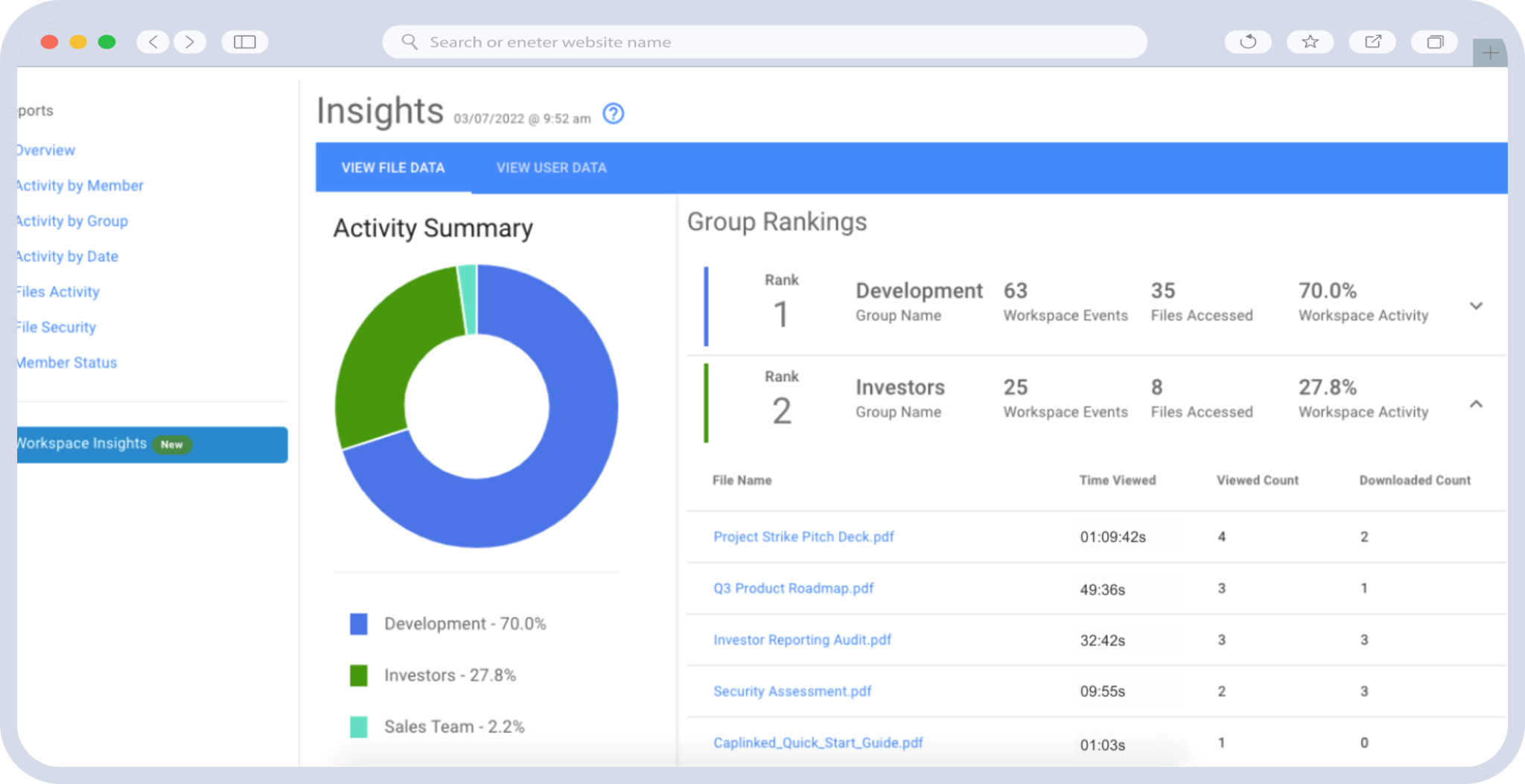
A well-organized data room does more than store documents—it generates intelligence. Modern VDR platforms provide detailed audit trails showing which users accessed which documents, how long they spent reviewing specific files, and what they downloaded or printed.
This activity data serves multiple strategic purposes:
- Gauge buyer interest: Heavy engagement with financial projections and customer contracts suggests serious intent; minimal activity may indicate waning interest.
- Anticipate questions: If multiple buyer-side reviewers are spending significant time on a particular contract or legal matter, proactively prepare supplementary materials or explanations.
- Demonstrate compliance: Audit trails provide a defensible record of who accessed what information and when, which is critical for regulatory compliance and post-close disputes.
As noted by the American Bar Association’s Business Law Section, maintaining a thorough record of the due diligence process is essential for both legal protection and transaction governance.
7. Establish a Q&A Workflow Within the VDR
Due diligence inevitably generates questions. Rather than managing these through scattered email threads—where questions get lost, duplicated, or answered inconsistently—use your VDR’s built-in Q&A functionality to centralize all buyer inquiries.
Effective Q&A management practices include:
- Assigning each question to the appropriate internal subject-matter expert
- Setting response deadlines and tracking turnaround times
- Categorizing questions by topic to identify patterns or areas of concern
- Maintaining a complete, searchable archive of all questions and answers
A centralized Q&A process prevents conflicting responses, ensures accountability, and demonstrates to buyers that your organization operates with discipline and transparency.
Advanced Strategies for Deal Management Efficiency
Once you’ve implemented the foundational VDR best practices above, consider these advanced strategies to further optimize deal management efficiency.
Stage Document Access Strategically
Not all information needs to be available from day one. Consider staging document access in phases aligned with the deal’s progression. For example, release high-level financial summaries and corporate overview documents during the initial phase, then unlock more sensitive materials—such as customer-specific revenue data, pending litigation details, or proprietary technology documentation—after the buyer has signed more restrictive confidentiality agreements or demonstrated serious intent through an indication of interest.
This staged approach protects sensitive information while maintaining deal momentum. It also gives sellers greater control over the narrative, ensuring buyers encounter context before complexity.
Conduct a Pre-Launch Audit With External Advisors
Before opening your data room, invite your outside legal counsel, investment banker, or M&A advisor to conduct a thorough review of the room’s structure, completeness, and organization. Fresh eyes will catch issues that internal teams—who are too close to the material—routinely miss.
Ask your advisors to evaluate:
- Whether the folder structure aligns with industry-standard due diligence categories
- Whether naming conventions are consistent and descriptive
- Whether any critical documents are missing or outdated
- Whether permission settings are appropriate for each user group
- Whether the data room index accurately reflects the room’s contents
Plan for Post-Close Data Room Management
The data room’s utility doesn’t end at closing. Post-transaction, the VDR serves as the definitive archive of the deal’s documentary record. Maintain the data room in its final state for a defined retention period to support integration activities, regulatory inquiries, earn-out calculations, indemnification claims, or any disputes that may arise after the transaction closes.
Ensure that post-close access permissions are updated immediately—revoking access for parties who no longer need it and granting access to integration team members as appropriate.
Choosing a VDR That Supports These Best Practices
Not every virtual data room platform is built to support the level of organization, security, and deal intelligence that M&A transactions demand. When evaluating VDR providers, prioritize the following capabilities:
- Granular permissions: Folder-level, subfolder-level, and document-level access controls
- Comprehensive audit trails: Detailed tracking of every user action within the data room
- Built-in Q&A management: Centralized question and answer workflows with assignment, tracking, and archiving
- Intuitive folder structure: Drag-and-drop organization, bulk upload capabilities, and automatic index generation
- Security certifications: SOC 2 compliance, 256-bit encryption, dynamic watermarking, and remote access revocation
- User-friendly interface: A platform that buyers and their advisors can navigate without technical training
CapLinked’s virtual data room platform is purpose-built for high-stakes transactions, providing enterprise-grade security, granular permissions, real-time activity tracking, and an intuitive interface that helps deal teams execute every one of these VDR best practices without friction.
Turn Your Data Room Into a Deal Accelerator
The difference between a deal that closes efficiently and one that stalls in due diligence often comes down to preparation and organization within the virtual data room. By implementing the VDR best practices outlined in this guide—from establishing a standardized folder structure and consistent naming conventions to leveraging activity tracking and centralized Q&A workflows—you position your transaction for speed, professionalism, and success.
Ready to organize your next deal for maximum efficiency? Start a free trial of CapLinked’s virtual data room and experience how a purpose-built VDR platform can streamline your M&A document management from day one.
Frequently Asked Questions
What are VDR best practices for organizing documents during M&A due diligence?
VDR best practices for M&A due diligence include establishing a standardized top-level folder structure that mirrors standard due diligence categories (corporate, financial, contracts, IP, HR, regulatory, litigation, insurance, technology, and real estate), using consistent file naming conventions with dates and document status indicators, creating a comprehensive data room index, and implementing granular role-based permissions. Pre-populating the data room to at least 80–90% completeness before granting buyer access is also critical for reducing delays.
How should you structure folders in a virtual data room for M&A?
A virtual data room for M&A should be structured with numbered top-level folders representing core due diligence categories such as Corporate Documents, Financial Information, Contracts and Agreements, Intellectual Property, Employee and HR Matters, and Regulatory and Compliance. Each top-level folder should contain logically organized subfolders segmented by document type, time period, or entity. Numbering folders (e.g., “01 – Corporate Documents”) controls display order and guides reviewers through the room in a logical sequence.
Why is document organization important in a virtual data room?
Document organization in a virtual data room directly impacts deal timelines, buyer confidence, and transaction costs. A well-organized VDR reduces the volume of follow-up information requests, signals professionalism and operational discipline to buyers, and minimizes professional fees by allowing legal and financial advisors to locate documents quickly. Poor organization, by contrast, erodes trust, gives buyers negotiating leverage for price reductions, and increases the risk of deal fatigue or deal failure.
What documents should be included in an M&A data room?
An M&A data room should include corporate formation documents, board resolutions, audited financial statements, tax returns, material contracts (customer, vendor, and partnership agreements), intellectual property filings, employment agreements, benefit plans, regulatory licenses and permits, pending or threatened litigation documentation, insurance policies, technology and cybersecurity assessments, and real estate or asset records. Working from a comprehensive due diligence checklist and cross-referencing it against your data room index helps ensure no critical documents are missing.
How do VDR permissions improve M&A deal security?
VDR permissions improve deal security by enabling administrators to control exactly who can view, download, print, or edit specific documents, folders, or subfolders. Role-based permission groups—such as buyer’s legal counsel, financial team, or executive team—ensure that sensitive information is only accessible to authorized parties. This granular control protects confidential data, supports regulatory compliance, and allows sellers to stage document access strategically as the deal progresses through different phases.
How can activity tracking in a VDR help during M&A negotiations?
Activity tracking in a VDR provides detailed audit trails showing which users accessed specific documents, how long they reviewed them, and what they downloaded or printed. This data helps sellers gauge buyer interest levels, anticipate questions about heavily reviewed sections, and make informed strategic decisions during negotiations. Activity logs also create a defensible compliance record demonstrating proper information governance throughout the due diligence process.